
•4 min readFeatured
How to Configure Doconut for Distributed Server Deployments
Step‑by‑step guide to run Doconut in distributed mode across a web‑farm, using shared file storage and encrypted widget stores for scalable .NET apps.
Read Article
Document handling in .NET: tutorials, release notes, and notes on the formats behind them.
Step‑by‑step guide to run Doconut in distributed mode across a web‑farm, using shared file storage and encrypted widget stores for scalable .NET apps.

Step‑by‑step guide to register the Converter plugin and activate the drop‑in widget in a .NET 8 app, with exact C# code you can copy.

Learn how to embed a high‑performance, secure document viewer into your .NET portal, manage sessions, and handle PDF, Office, CAD and images with Doconut.

Learn why Doconut’s Viewer is stateless, see the exact .NET 8 minimal‑API code that opens a document and returns a secure token.

Step‑by‑step guide to add a zero‑cost file manager and PDF viewer to an ASP.NET MVC app using Doconut’s universal viewer and ASP.NET Core session security.

Learn what a DWG file is, why it matters to developers, and how to render it in .NET web apps without extra installations using Doconut.

Add a DOCX viewer to ASP.NET Core with Doconut. Open Word files in C#, display them in the browser, and check fonts, tables, and pagination before deployment.

Compare Doconut SDK options for .NET Standard 2.1, .NET 6, and .NET 8, then choose the package that matches your application host and upgrade path.

Explore Doconut 26.8.0, including the new .NET Standard 2.1 package, current integration model, sample applications, and document fidelity improvements.

Evaluate a .NET imaging SDK with a practical scorecard covering rendering fidelity, performance, integration, operations, security, and total cost.

The current .NET 8 pattern: register the viewer, inject it, open a document asynchronously and return an opaque token.

Registering the .NET 8 Converter plugin, converting files and streams through dependency injection, and designing the workflow.

An architecture guide to embedding the viewer securely in ASP.NET Core, with optional React integration and access controls.

Embed Doconut’s server‑side PDF Viewer in ASP.NET and .NET Core for high‑quality rendering, OCR search, annotation, and printing – start your free trial.

Explore Doconut's Modify PDF Online API, PDF SDK, and UI components for .NET web apps. Learn annotation, highlight, OCR search, and secure integration.

Replacing a legacy viewer with a low-footprint PDF viewer SDK: rendering, accessibility, and Kendo UI support.

Integrating the conversion SDK with .NET, React, Angular and Vue front ends, step by step, with the security points to check.

Explore Doconut's .NET Document Viewer Library for Windows with OCR, annotation, search, and secure printing. Try the free trial to improve workflows.

Where document processing is heading for .NET developers: search, annotation, conversion and viewing files inside the app.

Build document automation workflows in .NET applications with Doconut Viewer, Search, Annotation, Conversion, and Controlled Printing plugins.

Build secure medical document viewing workflows in .NET applications with Doconut Viewer, Annotation, Search, Converter, and Controlled Printing plugins.

Compare open-source document viewing and imaging tools with commercial .NET SDKs, and learn when Doconut Viewer can help reduce integration complexity.

Explore how Doconut’s .NET SDK provides OCR, annotation, and secure cloud integration, plus a free trial to accelerate document workflows.

Discover how to choose a .NET imaging SDK with OCR, annotation, and a free trial. Learn cost, performance, security, and developer tips.

Secure .NET document viewers with server‑side OCR, annotation controls, token‑based access, watermarks, and a free trial of Doconut’s viewer.

Discover how Doconut’s .NET document viewer reduces memory usage with lazy loading, annotation, OCR plugins, and a free trial.

Enhance your governance, risk, and compliance workflows with a powerful document viewer, OCR, and annotation engine built for modern platforms.

A cross-platform CAD viewer for engineering teams: vector-accurate DWG rendering, layer management and review on mobile.

Streaming large PDFs and TIFFs for legal discovery, and what secure review asks of the viewer that renders them.

Explore secure, cross‑platform medical imaging SDKs with OCR and annotation, learn compliance best practices for HIPAA, GDPR, and API governance.

Learn how to evaluate total cost of ownership for imaging SDKs, covering cross‑platform, OCR, annotation, API, licensing, performance, support, future‑proofing.
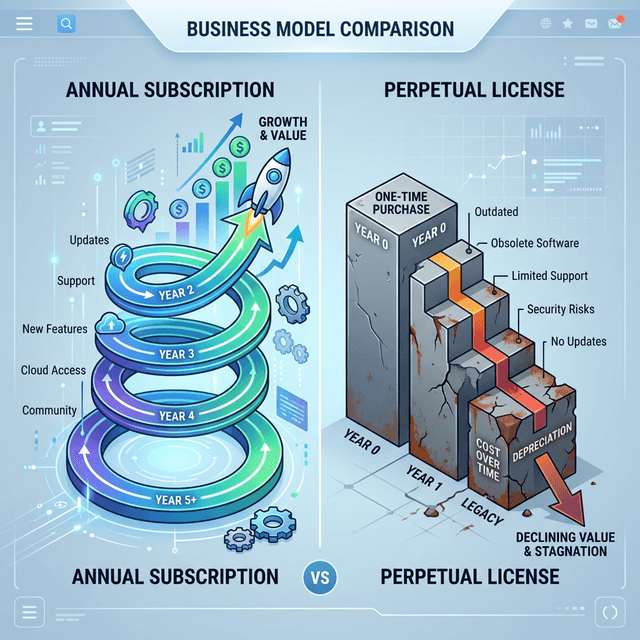
The case for annual subscriptions over perpetual licences in document viewer pricing, and what each model does to a roadmap.

A cost-benefit look at annotation and OCR plugins for engineering leaders: where the documentation time goes, and what it is worth.
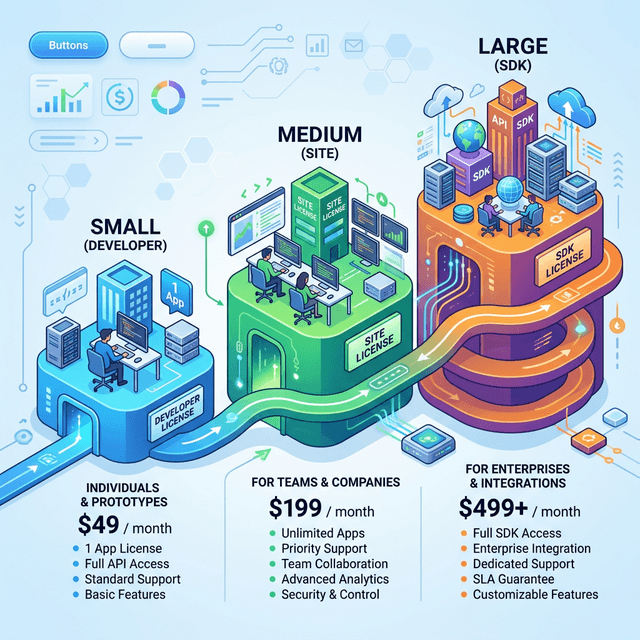
Developer, site and SDK licences compared: which one a team actually needs, and how the choice affects rolling a viewer out.

Why a one-time document viewer licence can cost an engineering budget more than it saves, and what a subscription changes.

Document management in 2026: AI-assisted reading, spatial interfaces, and which of these actually reaches the software teams ship.

Document rendering is CPU-bound. Async I/O, distributed caching and the other strategies that keep .NET Core processing under load.

Why client-side controls do not secure a document, and what server-side rendering, watermarking and access control actually cover.

Why scanned PDFs and images stay invisible to search, what OCR changes about that, and what to weigh before adding it to a web app.
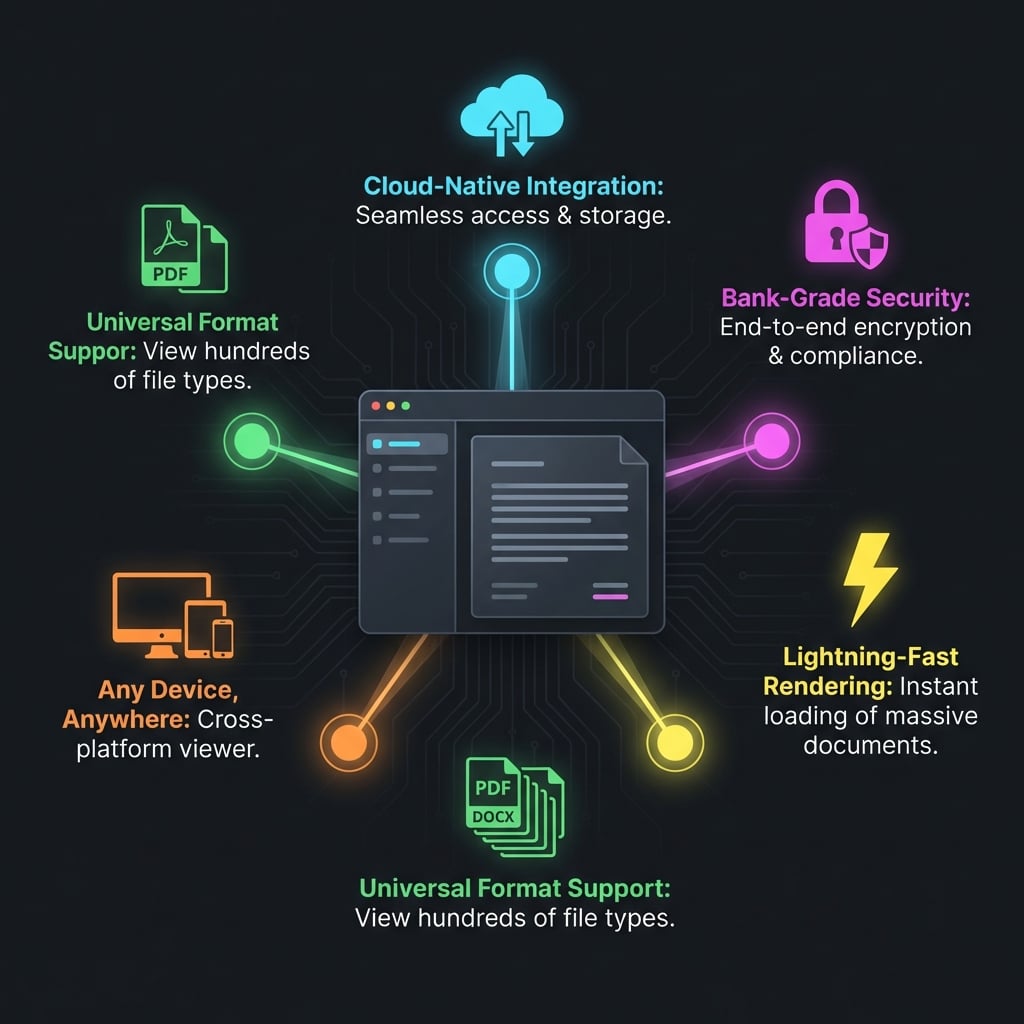
Five things enterprise buyers check in a document viewer: format coverage, rendering fidelity, annotation, security and performance.

Where manual document handling costs a .NET team time, and which parts of the workflow a rendering and conversion library takes over.

Tuning large-document rendering in ASP.NET Core: Redis and disk caching, concurrent processing and memory management.

Rendering AutoCAD DWG and DXF and MicroStation DGN files in .NET web apps, so site teams read blueprints without CAD software.

Upgrade your legacy ASP.NET WebForms and MVC apps with Doconut. Replace old ActiveX controls and Flash viewers with a modern, HTML5-based document viewer.

Ensure HIPAA and GDPR compliance with Doconut's secure document handling. Learn about server-side rendering, redaction, and access control for sensitive data.

Server-side document rendering for ASP.NET, MVC, Core, Web Forms and Blazor, and where conversion and security fit in.
Convert PDF to Word (DOCX, DOC) in .NET using Doconut Converter Plugin. Secure, offline, and high-performance document conversion for enterprise applications.

The Converter plugin: offline conversion of PDF, Word, Excel, PowerPoint, image, email and CAD files through one .NET interface.

Doconut lets .NET developers embed fast, secure document viewing, conversion, OCR and CAD rendering with a single API—no plugins, no client downloads.

Explore Doconut’s server-side viewer, OCR, and conversion engine for fast, secure document experiences in .NET applications.

A .NET document viewer and converter in one: server-side processing, annotations, and storage on Azure or Amazon S3.

Format support, the PDF engine and the integration path: what a .NET team gets from a viewer library instead of building one.

An in-app PDF, Office and CAD viewer with conversion and annotation, for ASP.NET, MVC, .NET Core and Blazor.

Why teams pick one .NET library for embedding PDF, Office, CAD and images, with conversion, annotation and fast rendering.

What the Annotation plugin adds to the viewer: highlighting, drawing and comments on top of any rendered document, and how it is wired in.

Embedding the document viewing SDK in an ASP.NET project in a few lines of code, and which plugin covers which capability.

Previewing PDFs, Word, Excel, images and CAD drawings without a download: adding the package and securing the integration.

Real-time collaboration on documents in .NET: annotation, document search and secure sharing when teams review the same file.

Where a document viewer sits in a .NET workflow: the formats it accepts, how it is integrated, and what readers can do with a PDF.

Multi-format viewing in a .NET application: the integration options, the interaction features, and what PDF modification covers online.
Document support, the PDF viewer and the integration steps for a .NET application, and what readers can do with a file once open.
Putting a document viewer inside ASP.NET, .NET Core and MVC applications, and the features readers use once the file is on screen.
What Doconut 25.7.0 brings to .NET applications, the deployment options it supports, and where each industry puts it to work.
Format coverage, rendering fidelity, annotation and search: what an organisation running on .NET gets from an embedded viewer.
Document interaction in .NET: native integration, the features readers touch, and the security side of rendering files server-side.
A feature tour of the .NET viewer library: format coverage, deployment options, annotation and editing tools, and document search.
Interface, loading time, search, annotation and security: the parts of a document viewer that a reader actually notices.
How the viewer handles multi-language interfaces, and what changes for an application whose readers do not share one language.
Viewing, annotating and redacting PDFs from .NET: what the PDF engine handles directly and which plugin each capability needs.
Rendering .xls, .xlsx and .ods spreadsheets inside a .NET application: which Excel formats are supported and what the viewer draws.
What a DWG file stores - vector geometry, layers, dimensions - and how a .NET viewer renders one without AutoCAD on the machine.
What ADA and WCAG ask of a document viewer, and which parts of accessible viewing belong to the renderer rather than the page around it.
Integrating a document viewer into Blazor apps, from finding the NuGet package to rendering the first file.

The cost of answering every document request with a download link, and what changes when the file opens inside your own application.
Why teams that handle contracts, reports and spreadsheets daily embed a viewer instead of asking users to download every file.
How finance, legal and enterprise teams handle Word, Excel, PDF and email in one pipeline, and what document processing covers.
Handling Word, Excel, PowerPoint, PDF and email formats in one .NET library, and which engine covers which family.
What developers need from a document viewer in enterprise apps, SaaS platforms and internal tools, and where a .NET library fits.
Two changes to the PDF engine: image compression that lowers output size, and better table layout in complex documents.

Opening Word, ODT and the other office formats from .NET, and how document formats came to be this varied in the first place.

Viewing OpenOffice ODS spreadsheets in a .NET application, and what changes compared with the Excel formats beside them.
Release notes for Doconut 25.1.0: more reliable ExportToPng and ExportMetadata, plus viewer-specific fixes across the format engines.
Viewing high-quality image files in .NET applications, from photo management tools to document workflows that mix images and text.
The document formats academic institutions actually handle, and what changes when lesson plans and research papers open in the browser.
Opening archived MSG and EML email files in .NET, including attachments, for legal and compliance teams that have to read them.
Release notes for Doconut 24.12.0: custom font directories for Word, smarter Excel sorting and visual fixes across the viewers.
Where a .NET document viewer fits in business software: document management systems, enterprise portals and finance applications.
Viewing patient records and medical imaging inside hospital applications, and the constraints a healthcare document viewer has to meet.
Adding document viewing to university e-learning and intranet platforms, so students open coursework without installing desktop software.
Release notes for Doconut 24.11.0: higher-resolution Excel output, better handling of complex emails and clearer PowerPoint rendering.
How research labs handle SVG diagrams and Visio experiment plans, and what a shared viewer changes about reading them.
How law firms move through contracts, filings and discovery material, and what a shared document viewer changes about review time.
TIFF stores multi-page scans losslessly, which is why archives still use it. How the format works and where .NET applications meet it.
Opening Microsoft Project MPP and XML files in .NET, what the format stores, and where teams need them outside Project itself.
PSD files carry layers, transparency and effects. What survives when a design company renders one outside Photoshop.
What EML and MSG files actually contain, how the two differ, and how a .NET application opens them without an email client.
What architecture firms do with drawings, specs and client documents, and where a .NET viewer fits into that workflow.
Five parts of the viewer worth using: uploads, search, file previews, secure sharing and multi-format support.
Engineering and construction teams open CAD drawings without the software that made them. What a unified viewer changes on site.
How DWG, DGN and DXF came to be, what each format stores, and how a .NET viewer renders them server-side without AutoCAD installed.
Handling PowerPoint and OpenOffice presentations across an organisation, and what an embedded viewer changes about sharing decks.
Why PDF became the format everything converts to, and how a .NET library handles converting other documents into it.
What the .NET viewer adds to ASP.NET and .NET Core projects, and a short history of the PDF format it renders.
Release notes for Doconut 24.8.0: search and copy across document types, the SplitSegments option and wider system support.
How the cloud plugins move rendered output to AWS, Azure and Google Cloud, and what that changes about where your documents live.
Whether you're a business professional, student, or casual user, converting your documents into PDF format offers a range of benefits.
Seven things a .NET Core or Blazor project gains from an embedded viewer, from PDF output to cross-platform hosting.
What a document viewer library changes for the people who read files all day, and for the developers who have to ship it.
Viewing and editing documents online with ASP.NET and .NET Core, including SharePoint and Blazor hosts, and what each one needs.
A walkthrough of the viewer: the formats it covers, the plugins that add capabilities, and what to expect from performance.
Search and export in the viewer, including PDF export, and where each one saves time in a document workflow.
What goes wrong with bolting an external viewer onto a .NET app: the user experience, the security surface and the time it costs.
Running the viewer on .NET 8 with a React front end: what the runtime upgrade brings and how the two sides are wired together.
Release notes for Doconut 24.5.0: custom font support for PowerPoint, lower memory use, licence integration and a faster PDF viewer.
Why teams read Word, Excel and PowerPoint files in the browser: access from any device, no local install, and one place to update.
Displaying CSV files in a .NET application without handing them to a spreadsheet program, and what the viewer does with large ones.
Putting a .NET-rendered document viewer inside a React front end, and how the two halves talk to each other.
Release notes for Doconut 24.4.0: the enhancements and fixes in this version, and what they change for existing projects.
What is coming to the CAD engine for AutoCAD DWG and DGN files, and which drawing details the renderer will handle.
Release notes for Doconut 24.3.1, now published on NuGet, and how to move an existing project onto it.
Release notes for Doconut 24.3.0: native .NET 6.0 support, a rebuilt CAD viewing engine and updates to the PDF, Word and image engines.
Doconut packages are published on NuGet: what that changes about installation, and which products the feed now covers.
Release notes for Doconut 1.0.5.2: PDF performance, and updates to the Word, Visio, Project and email rendering engines.
Common questions about the .NET viewer: ASP.NET MVC and Razor, Web Forms, .NET 6 and later, Blazor, and what each one needs.
Release notes for Doconut 1.0.5.1 and what cross-platform support changes for teams not running on Windows.
Release notes for Doconut 1.0.5.1, published in January 2024, and the changes worth knowing before you update.
Viewing Microsoft Visio diagrams in .NET without Visio installed, and what the renderer keeps from the original file.
Pairing the .NET viewer with Amazon S3: where the files live, what gets rendered on demand, and how the two fit together.
Why Doconut stopped calling itself the best online document viewer, and what changed when the product became a processing API.
Release notes for Doconut 1.0.5.0 and the HTML engine upgrade behind it, plus what to check after updating.
How Doconut.app was built on the same .NET rendering library, and what the hosted product shares with the SDK behind it.
Release notes for Doconut 1.0.5.0: document engine changes, faster email rendering, PSD handling and the updates developers should read.
One interface for many document formats in ASP.NET: Web Forms, MVC and .NET Core, with the same viewer behind each of them.
Rendering Word, Excel and PowerPoint files in ASP.NET without Office installed on the server, and what that means for deployment.
What you actually get from free and open-source ASP.NET document viewers, and where the commercial ones draw the line.
Using an ASP.NET viewer inside electronic document management systems, where files are stored digitally and opened by many users.
Letting remote learners open course material in the browser when the software that created the file is not installed on their machine.
The redaction and annotation API in ASP.NET: marking up Word, Excel, PowerPoint and PDF files through one interface.
Exporting rendered documents to Amazon S3, Google Cloud Storage, Azure File Storage and other cloud targets from a .NET viewer.
Adding document viewing to a Blazor Server application in C#, without dropping into JavaScript for the rendering layer.
What a C# document viewer control adds to an existing ASP.NET or .NET Core project, and how it differs from a hosted online viewer.
A C# document viewer for ASP.NET MVC and .NET Core: what it takes to add file viewing to an existing project, and where to try it first.
A document viewer for ASP.NET Core: Docker support, load balancing and multiple IIS worker processes, with a live demo to try.
Running the viewer behind a load balancer: web farms, multiple IIS worker processes, and what horizontal scaling asks of a document viewer.
Doconut as an ASP.NET document viewer across Web Forms, web services, MVC and .NET Core, and how the same control fits each of them.

What this blog covers: product updates, sample code and notes on the formats the .NET viewer renders.